


Windows RDP Hosting Good for Secure Software Testing?
Checking software has become increasingly challenging for made teams. Did you know that over 70% of teams face delays due to unforeseen issues? Bugs are common, deadlines are tight, but the risk of a security breach is a real concern with Windows RDP hosting.
Remote work adds another layer of complexity to this process. Developers use a range of tools and work in various locations. This decentralized arrange can easily lead to costly errors and, unfortunately, opens the door for hackers. There is, however, a smarter, safer solution: Windows RDP Hosting.
Checking environments must be safe and efficient. We understand how a Virtual Private Server (VPS) can transform your workflow. It provides a safe, centralized location where you can test your applications, accessible from anywhere. Ultimately, this keeps your work safe and your team productive.
❓ What Exactly Is Windows RDP Hosting for Testing?
Before exploring the benefits, let’s clarify the key concepts. If you’re new to the topic, you might have some initial questions.
What is a Virtual Private Server (VPS)?
Think of a VPS as a completely private room inside a massive, powerful computer. It is your own dedicated, isolated space on that server. Crucially, you do not share computing resources with other “neighbors.” This isolation makes the environment inherently safe and stable.
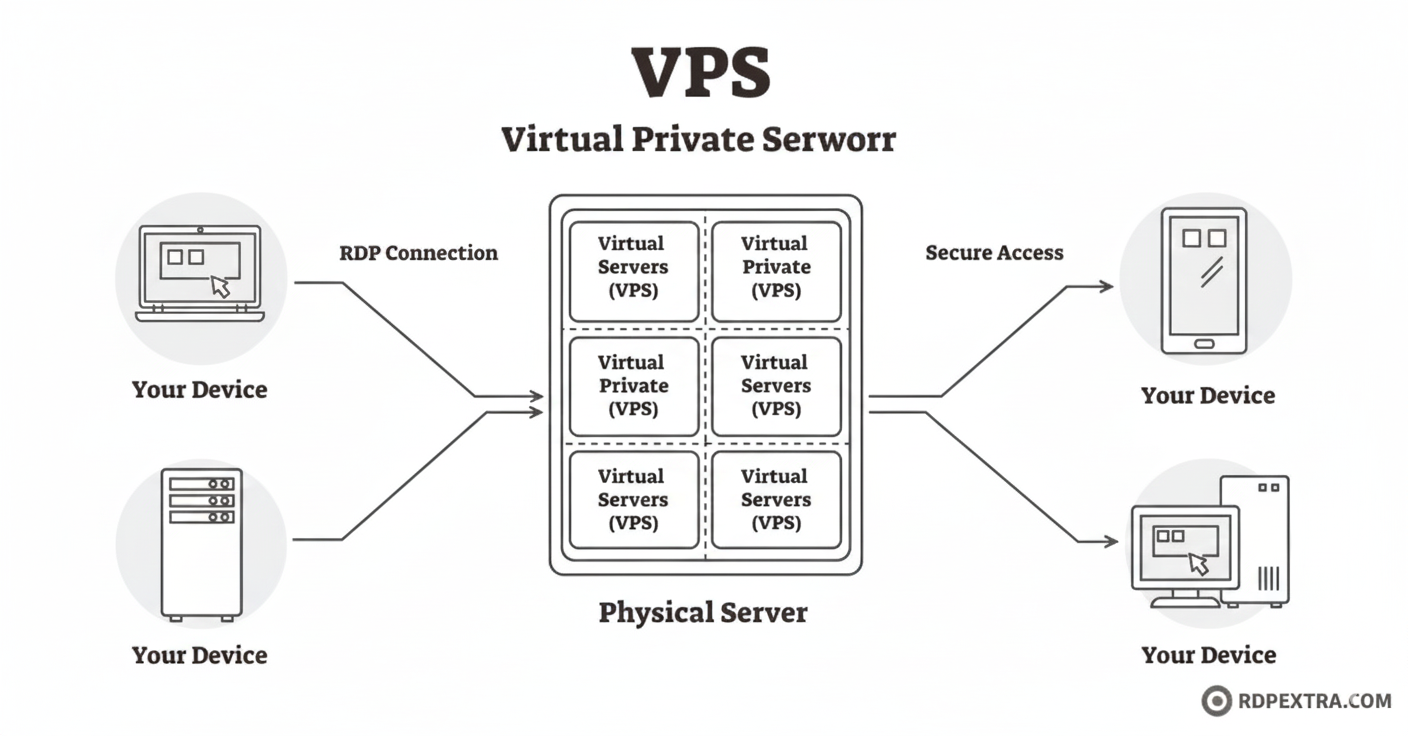
What is Virtual Private Server Hosting?
VPS hosting is the service that rents you this private, remote room. It allows you to run your software, thoroughly test your applications, and safely store important files. You control this remote server and managed VPS for testing it just like you would your own local, physical PC.
✅ Why Choose Windows RDP Hosting for Testing?
Many major sectors are successfully switching to this remote method, from finance to modern SaaS companies. People are finding immense value in it. Here is precisely why Windows RDP hosting is an excellent choice for safe software Checking.
1. Building Isolated Test Environments
Checking new features directly on a live production system is incredibly risky. A single crash or unexpected error could easily lead to the deletion of valuable, real-world data. Therefore, admin access RDP server hosting gives you an essential “sandbox” environment.
You can effortlessly create a dedicated Windows Virtual Private Server environment specifically for checking purposes. If this test environment breaks or crashes, your main production system remains completely safe and unaffected. This arrange safely replicates real-life scenarios but keeps the potential danger entirely away.
2. Controlled and safe Team Access
Not every member of your team rdp hosting needs access to every single file or project. A VPS is the ideal tool for a managed VPS for testing this access. You are in complete control, and you can decide exactly who sees what files.
Moreover, as a project manager, you can grant access only to the correct, authorized people. This keeps the Checking workflow organized and clean. Consequently, it drastically minimizes the risk of accidental or malicious data leaks. This organized method builds strong trust among remote workers by ensuring strict control over project access.
3. Compatibility with All Testing Tools
Are you concerned about integrating your existing made and checking tools? Don’t be; a Virtual Private Server Windows hosting arrange is extremely flexible and versatile. It is designed to work seamlessly with the vast majority of modern Checking frameworks.
You can easily run complex test automation tools and check deep-dive analytics. Furthermore, since the server infrastructure is powerful and remote, your tests run significantly faster. You will receive stable, consistent, and reliable performance every single time.
🆚 Comparison: Local Testing vs. Windows RDP Hosting
Why should you make the switch to a remote setup? Let’s analyze the differences side-by-side for a clear comparison.

🛡️ Maximizing Security in Your RDP Environment
Security remains the absolute core of good software made practices. You need the best Virtual Private Server configuration to successfully keep threats away from your intellectual property. A simple security mistake can lead to massive problems. Here are some essential tips to keep your Windows Virtual Dedicated Server safe and safe.
- Enable Strong Encryption and MFA
Windows already includes strong base security features. However, you must always add extra layers for maximum protection. Use powerful, current encryption protocols for your data transfers. In addition, always enforce strict login rules. Multi-factor authentication (MFA) is not optional; it is a must. This crucial step effectively stops strangers from ever logging into your server.
- Limit Access Using IP Whitelisting
Who exactly is permitted to enter your dedicated server? You should have explicit knowledge and control. Implement IP whitelisting. This feature ensures that only specific, trusted IP addresses from your team can connect to the server. It adds a powerful extra layer of safety, which is absolutely perfect for remote teams utilizing a Virtual Private Server.
- Watch and Log All Activity
Always maintain a vigilant eye on all activity within the server. Project managers should actively track who logs in and when. You should also check what specific files have been accessed or modified. Therefore, this helps you rapidly spot any odd or suspicious behavior. Good, detailed logging practices build immense confidence in your entire Checking process.
💡 Final Thoughts
Software Checking does not have to be a stressful or scary part of your made lifecycle. Windows RDP hosting successfully makes the entire process both safe and significantly easier. It is a robust method that perfectly protects your valuable data. As a result, it helps your remote team collaborate and work better, no matter their physical location.
In conclusion, the use of a Virtual Private Server Windows setup is strongly advocated for. It is the definitive smart move for any modern business looking to streamline its made and security.
Ready to ditch risky local setups and save your made pipeline?
Get started with highly safe, high-performance Windows RDP Hosting solutions from RDPextra today. Move your testing to a bulletproof, centralized environment and unlock superior team collaboration!
❓ Frequently Asked Questions (FAQs)
Windows RDP Hosting is safer because it isolates your testing environment on a virtual private server (VPS). Sensitive data never leaves the safe data center. If a local device is lost, your project code remains safe on the server. RDPextra adds security with features like Multi-Factor Authentication (MFA).
Yes, absolutely. A Windows virtual private server environment is compatible with almost all standard testing tools and frameworks. The server’s dedicated, scalable resources allow teams to run complex, automated tests faster and more reliably than they could on a standard local machine.
RDP hosting enhances collaboration by allowing geographically scattered team members (developers and testers) to access the exact same virtual machine simultaneously. They can log into the shared environment to see the same screen, debug issues, and review code together in real-time. This eliminates the delays and security risks associated with constantly sharing large files or relying on slow, local screen-sharing tools.
To maximize security on your Windows RDP Hosting setup, focus on the fundamentals outlined by RDPextra:
1. Enforce Multi-Factor Authentication (MFA) for all logins.
2. Implement IP Whitelisting to restrict connections to approved locations only.
3. Ensure Regular Patching and System Updates to fix security vulnerabilities promptly.
4. Utilize Session Logging to monitor and audit user activity for immediate detection of anything suspicious.