

USA Windows VPS with Full Admin Access

Get a Windows VPS in the USA with full administrator access, SSD storage and a dedicated IP. Connect from Windows, Mac or mobile over Remote Desktop (RDP) and run your own software around the clock.

Every server is set up manually and delivered within 4–8 hours of payment confirmation. RDP is already enabled when your server arrives.

Used for remote work, development and testing, business software and automation.

  • ✅ USA Datacenter Location
  • ✅ Full Administrator / Admin Access
  • ✅ Windows Server Options
  • ✅ 1Gbps Network Port
  • ✅ 99.99% Uptime
  • ✅ 24/7 Technical Support

Windows VPS Plans with Full Admin Access

Choose the right Windows VPS plan based on your performance and workload requirements. All plans include full administrator access and USA datacenter location.

✔ No Overselling
✔ Dedicated Resources
✔ USA-Based Infrastructure
✔ 99.99% Uptime
✔ Secure Manual Provisioning

Secure Manual Provisioning within 4–8 Hours

Windows VPS Silver

$40.99/mo
Buy Now
  • 2 vCPU 3.40GHz
  • 2 GB DDR4 RAM
  • 30 GB SSD Storage
  • 500 GB Bandwidth
  • USA Datacenter Location
  • 1Gbps Network Port
  • Windows Server
  • Full Admin Access
  • 1 Dedicated IP
  • SEO Tools Supported

Windows VPS Diamond

$85.94/mo
Buy Now
  • 4 vCPU 3.40GHz
  • 16 GB DDR4 RAM
  • 150 GB SSD Storage
  • 3 TB Bandwidth
  • USA Datacenter Location
  • 1Gbps Network Port
  • Windows Server 2012/2016/2019
  • Full Admin Access
  • 1 Dedicated IP
  • High-Performance

Windows VPS Platinum

$117.99/mo
Buy Now
  • 4 vCPU 3.40GHz
  • 32 GB DDR4 RAM
  • 200 GB SSD Storage
  • 5 TB Bandwidth
  • USA Datacenter Location
  • 1Gbps Network Port
  • Windows Server
  • Full Admin Access
  • 1 Dedicated IP
  • Maximum Resources

What Is a Windows VPS?

A Windows VPS (virtual private server) is a Windows server with its own CPU, RAM and storage, running in a data center. You connect to it from your own computer with Remote Desktop (RDP), so it works like a Windows PC that is always on. With full administrator access you can install your own software and manage every setting yourself. Our servers are hosted in the USA, so websites and services in the US see a US IP address.

Windows VPS vs Windows RDP: the VPS is the server, and RDP is the way you connect to it. Our plans are Windows VPS servers that you use over RDP, so you get both, with dedicated resources and full administrator access.

You can connect from Windows, macOS, Android or iOS with the Microsoft Remote Desktop client.

Our Windows VPS servers are manually provisioned to ensure optimized performance, reliable connectivity, and secure configuration for long-term usage.

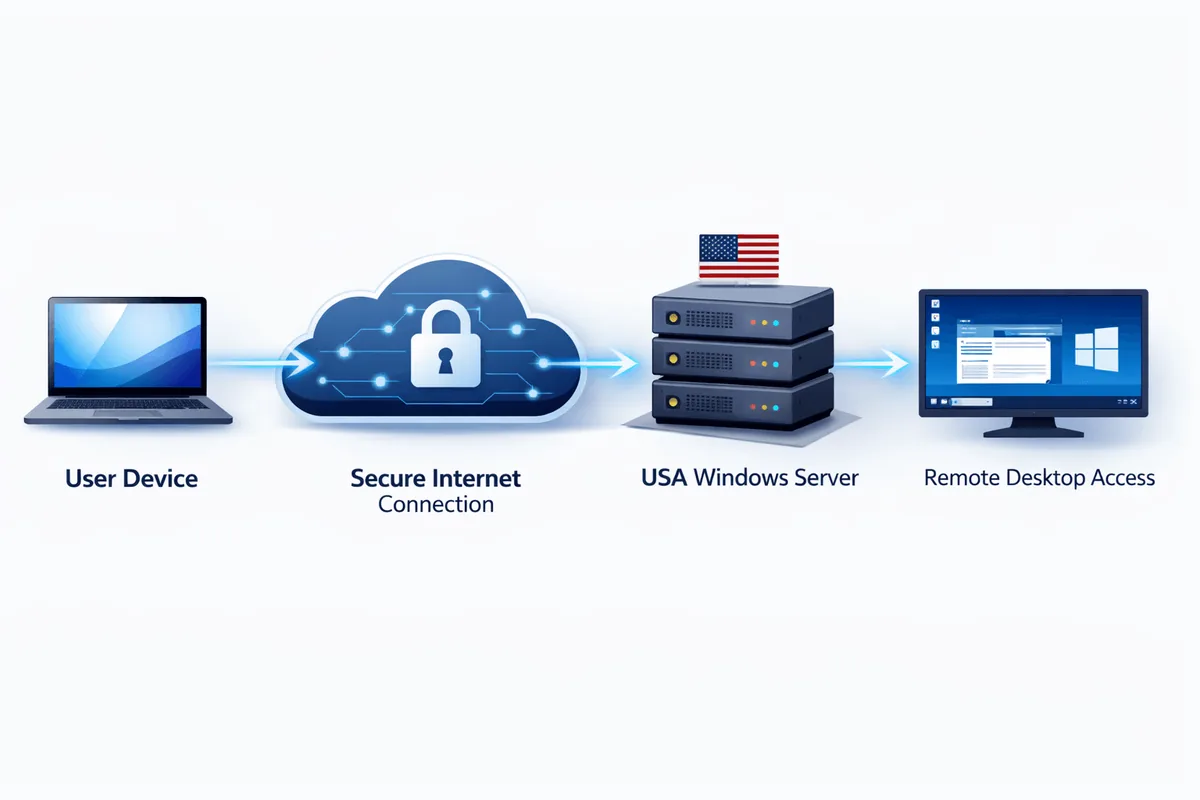
How a Windows VPS Works

A Windows VPS allows you to access a Windows-based server hosted in a USA datacenter from your own device through a secure remote desktop connection. Instead of running applications locally, all processing and storage take place on the high-performance remote server.

1

Connect securely from any device (Windows, macOS, or Mobile).

2

Data travels through a secure internet link to our USA datacenter.

3

Manage your files & applications with a dedicated USA-based IP.

This setup provides consistent performance and the flexibility to work remotely without depending on local hardware limitations.

Windows VPS Connection Diagram

🚀 Reliability First: Our USA-based infrastructure ensures stable connectivity and 99.99% uptime for all professional workloads.

Common Use Cases of a USA Windows VPS

Windows VPS servers are widely used by professionals and businesses that require stable remote access, secure software environments, and USA-based IP connectivity through a Windows VPS remote desktop environment.

💻

Remote Work & Secure Software Access

Access your Windows desktop and applications from anywhere while keeping your work environment running continuously in a secure USA datacenter.

🛠️

Software Development & Testing

Developers use Windows VPS environments to test applications, run development tools, and maintain isolated working environments without affecting local systems.

🚀

Business Applications & Automation

Run business software, data processing tools, or automation workflows on a stable high-performance remote Windows environment without depending on local hardware uptime.

📊

SEO & Digital Marketing Tools

A Windows VPS is commonly used for running SEO tools, analytics software, and marketing applications that require consistent uptime and stable performance.

🛡️

Secure Remote Desktop Environment

Businesses and individuals use USA Windows VPS servers to maintain a secure, always-available Windows environment accessible from multiple devices.

Why Choose RDPextra for a Windows VPS in the USA?

RDPextra provides high-performance Windows VPS solutions designed for stability, security, and long-term reliability. Unlike automated or oversold environments, every server is carefully provisioned to ensure consistent performance. This ensures every Windows VPS delivers stable performance, secure remote access, and reliable long-term usage for professional workloads.

🛡️

Manual Secure Provisioning

Every Windows VPS server is manually configured to ensure proper resource allocation, secure setup, and optimized performance. Manual provisioning helps prevent configuration issues commonly found in automated or mass-provisioned environments.

🚫

No Overselling Policy

We maintain strict resource allocation policies to ensure each VPS receives dedicated performance capacity. This results in stable speed, consistent uptime, and reliable remote desktop performance.

🇺🇸

USA-Based Infrastructure

All servers are hosted in reliable USA datacenters with optimized routing and low-latency connectivity. This ensures stable access and consistent performance for users worldwide.

🔑

Full Administrator Access

All plans include full administrator access, allowing you to install software, configure settings, and manage your Windows environment without restrictions.

⚡

High-Speed Network Performance

Our Windows VPS servers operate on high-speed network connections designed for smooth remote desktop usage, fast data transfer, and uninterrupted workflow performance.

📈

Reliable Uptime & Support

RDPextra infrastructure is optimized for long-term stability, supported by uptime-focused monitoring and technical assistance to ensure continuous service availability.

RDPextra Windows VPS solutions are built for professionals who require stable performance, secure remote access, and reliable infrastructure. Whether you need a Windows VPS for business applications, development, or remote work, our servers are optimized to deliver consistent performance and dependable uptime.

Frequently Asked Questions About Windows VPS

  • 1. What is a Windows VPS?

    A Windows VPS is a virtual server that runs Windows and has its own CPU, RAM and storage. You manage it over Remote Desktop (RDP) with full administrator access, like a Windows PC in a data center.

  • 2. What is the difference between a Windows VPS and Windows RDP?

    RDP is the protocol used to connect to a server. A Windows VPS is the server itself. Our plans are Windows VPS servers that you open through RDP, so one plan gives you both.

  • 3. Do I get full administrator access?

    Yes. All Windows VPS plans include full administrator (admin) access, allowing you to install software, change system settings, and fully manage your Windows environment without restrictions.

  • 4. How long does it take to receive my Windows VPS?

    All servers are manually provisioned to ensure secure configuration and stable performance. Setup is completed within 4–8 hours after payment confirmation.

  • 5. Which Windows Server versions are available?

    Our Gold and Diamond plans are available with Windows Server 2012, 2016 or 2019. Silver and Platinum come with Windows Server. If you need a specific version, ask our support team before ordering.

  • 6. Where are your Windows VPS servers located?

    Our servers are hosted in USA data centers with optimized routing and stable connectivity for users accessing the server from anywhere in the world.

  • 7. How do I connect to my Windows VPS using Remote Desktop (RDP)?

    RDP is already enabled on your server when it is delivered. On Windows, open Remote Desktop Connection (mstsc), enter your server IP, and sign in with the login details we send you. On macOS, use the Microsoft Remote Desktop app.

  • 8. Can I connect to my Windows VPS from a Mac?

    Yes. Install Microsoft Remote Desktop from the Mac App Store, add your server IP and login details, and connect. Android and iOS work the same way with the Remote Desktop app.

  • 9. Can I install my own software on my Windows VPS?

    Yes. With full administrator access, you can install and run compatible software according to your requirements.

  • 10. Can I pay by credit card?

    Yes, credit cards are accepted at checkout.

  • 11. What is your refund policy?

    Refunds are handled under our Refund Policy, which also applies to Windows VPS plans. You can read the full terms on the Refund Policy page.

  • 12. Is the internet speed shared or dedicated?

    All plans include high-speed network connectivity designed for stable remote desktop performance. Resources are allocated carefully to maintain consistent performance and avoid overselling.

  • 13. What can a USA Windows VPS be used for?

    A Windows VPS is commonly used for remote work, business applications, software development, testing environments, and secure remote access to Windows software that requires stable uptime, consistent performance, and a USA-based server environment.

  • 14. How can I transfer files between my computer and my Windows VPS?

    Files can be transferred using RDP drive sharing, clipboard copy and paste, secure FTP/SFTP connections, or cloud storage services such as OneDrive or Google Drive depending on file size and workflow requirements.

  • 15. How can I secure my Windows VPS?

    Recommended practices include using strong passwords, enabling Network Level Authentication (NLA), keeping Windows updated, restricting access by IP when possible, and disabling unused accounts to maintain a secure remote desktop environment.

View Windows VPS Plans

Secure setup within 4–8 hours • Full admin access included

24/7 EXPERT ASSISTANCE

Need Expert Assistance with Your Windows VPS?

We Are Here to Serve You 24/7

RDPextra 24/7 Support Team

At RDPextra, we understand that reliable support is just as important as reliable infrastructure. Our support team is available around the clock to assist you with setup questions, connection guidance, and technical inquiries, ensuring you always have help when you need it.

Whether you are choosing the right Windows VPS plan, setting up your remote desktop connection, or optimizing performance for your workload, our experienced specialists are ready to provide clear and practical assistance.

What You Can Expect from Our 24/7 Support:

  • ✔ Fast and responsive assistance
  • ✔ Experienced technical support team
  • ✔ Multiple communication channels
  • ✔ Reliable and professional guidance
  • ✔ Help with setup and connection issues

Need Help Before Ordering?

Our team is ready to assist you in selecting the right Windows VPS plan and answering any technical questions before you get started.

24/7 assistance • Setup guidance available • Reliable technical support

Trusted by Thousands of Clients and Businesses Worldwide

Thousands of professionals, businesses, and developers rely on RDPextra for reliable Windows VPS solutions. Our customers value stable performance, full administrator access, and responsive support that helps them stay productive without interruptions.

⭐⭐⭐⭐⭐
Excellent Serving customers since 2019

Other RDP and Server Options

More Windows & VPS Plans

Explore additional Windows VPS and remote desktop plans designed for performance, flexibility, and reliability. Choose from a range of configurations suitable for remote work, development, hosting, automation, and everyday computing needs.

Windows RDP

Windows RDP

$17.49/month

Ideal for remote work, development, automation, hosting, and everyday Windows-based tasks.

Order Now
  • Intel i7/ AMD
  • Windows Server 2019/2022
  • 1 vCPU
  • 4GB RAM
  • 50GB Pure SSD NVMe
  • 1TB Bandwidth
  • RDP Access
  • 1 Dedicated IP
  • 1 Gbps Network
Europe Location

CHEAP RDP

$18.75/month

Affordable Windows RDP solution for remote access, basic workloads, and everyday computing tasks.

Order Now
  • Intel i7 Processor
  • 8 GB DDR4 RAM
  • 1 Gbps Internet Speed
  • 50 GB Storage
  • Unlimited Bandwidth
  • Pre-Installed Apps
  • Windows Server 2019 (64-Bit)
  • No Admin Access
  • Europe Location
  • 24/7/365 Support
  • 99.99% Service Uptime
  • Botting Strictly Not Allowed
  • Activation Within 3 Hours

More Server Options

RDPextra also offers additional dedicated RDP solutions designed for specific workloads and performance requirements. Whether you need an optimized environment for encoding, managed setup, or high-speed connectivity, these options provide flexible alternatives.

DEDICATED SERVER

USA Dedicated Server

$118.99/month

Powerful dedicated server with full admin access and reliable performance.

Order Now
  • 1 Gbps Internet Speed
  • 160 GB SSD + 500 GB Enterprise HDD
  • 10 TB Premium Bandwidth
  • USA Location
  • 1 Dedicated IP Address
Fully Managed

AMD Dedicated server

$90.99/month

High-performance AMD server with dedicated resources and full control.

Order Now
  • AMD Ryzen 7 1700X
  • 16 GB RAM
  • 1 Dedicated IP Address
  • Windows Server 2022/2025
  • 100 GB Enterprise Storage
  • 1 Gbps Internet Speed
High Bandwidth

10Gbps USA RDP

$52.99/month

Built for bandwidth-intensive tasks requiring high-speed connectivity.

Order Now
  • 2 Core CPU
  • Up to 10Gbps Network Speed
  • Unmetered Bandwidth
  • Windows Operating System
  • Administrator Access Included

Which RDP Should You Choose?

Choosing the right RDP solution depends on your workload, performance requirements, and IP type preference. Below is a simple comparison to help you decide which option best fits your needs.

Economy Encoding RDP

BEST FOR: LIGHTWEIGHT ENCODING & MEDIA TASKS
  • Optimized for encoding workloads
  • Dedicated system resources
  • Stable performance and uptime
  • High-speed network connectivity
  • Cost-effective encoding solution

Recommended for: Content creators and professionals looking for a budget-friendly RDP for encoding, transcoding, and media workflows.

Real Residential VPS

BEST FOR: SEO, SOCIAL MEDIA & GEO-TARGETED TASKS
  • Real Residential ISP IP Address
  • Dedicated VPS Resources
  • High-Trust Residential Connectivity
  • Stable Performance and Uptime
  • Ideal for SEO, Ads & Account Management

Recommended for: Users who need a real residential IP with dedicated VPS resources for SEO, social media management, ad verification, market research, and geo-targeted browsing.

More RDP Services That Might Suit Your Project

RDPextra also provides specialized RDP environments designed for specific workloads and project requirements. These solutions are optimized for users who need dedicated configurations beyond standard setups.

Development & Testing

Android Emulator RDP

$37.49/month

Remote Android environment for application testing and emulator-based workflows.

Order Now
  • Remote Android Emulator
  • Stable Remote Desktop Access
  • Optimized for Development
  • SSD Storage Performance
  • Windows-Based RDP Access
GPU Performance

Gaming RDP

$36.25/month

High-performance environment for graphics-intensive apps and GPU workloads.

Order Now
  • GPU-Supported Environment
  • NVMe SSD Storage
  • High-Speed Network Port
  • Optimized Graphics Engine
  • Dedicated Resource Options
Private Workflow

Specialized RDP Solution

$137.50/month

Private RDP environment for secure access and specialized online workflows.

Order Now
  • Private Remote Desktop
  • Secure Access Configuration
  • Stable Connectivity
  • Dedicated IP Options
  • Windows Operating System

Windows VPS Hosting in the USA, Built for Performance and Reliability

RDPextra Windows VPS hosting is designed for users who require stable performance, full administrator access, and dependable remote desktop connectivity. Our infrastructure is optimized for consistent uptime, secure provisioning, and smooth Windows VPS performance.

This makes our environment suitable for professional workloads, business applications, and long-term remote usage. By choosing RDPextra, you are investing in a secure, high-speed Windows environment backed by 24/7 technical support and reliable hardware.

🚀 High-Speed Connectivity
🛡️ Secure Provisioning
💎 Dedicated Resources

Choose Your Windows VPS Plan

Get a reliable Windows VPS with full administrator access, stable performance, and secure manual provisioning. RDPextra servers are designed for professionals and businesses that require consistent uptime, high-speed connectivity, and a dependable remote Windows environment so you can work, deploy applications, and access your Windows environment reliably from anywhere.

Whether you need a Windows VPS for remote work, development, business applications, or secure software access, our USA-based infrastructure ensures smooth and reliable performance.

✔ Full Admin Access ✔ USA Datacenter ✔ Dedicated Resources ✔ 4–8h Secure Setup ✔ 99.99% Uptime
View Windows VPS Plans

Secure setup within 4–8 hours • Full admin access included • No overselling