Residential VPS with a Real USA ISP IP

From $89.99/mo

A real USA ISP residential IP on your own Windows RDP. We check each IP by hand, so setup takes 1–2 hours.

Every RDPextra residential VPS runs on a real USA ISP connection, not a datacenter range relabeled as residential. We check each IP by hand before it is assigned to you. That check is why setup takes 1–2 hours, not the instant provisioning cheaper providers advertise.

It’s built for remote desktop work that needs a home-network IP: surveys, research, affiliate marketing, account management and long-running sessions.

  • A real residential IP from a USA ISP, with no proxy or shared IP layer in between
  • A fresh, never-assigned IP on every plan, at no extra cost
  • Up to 1 Gbps port and full Windows admin access
  • Each server set up and checked by hand, not auto-provisioned
See Plans & Pricing

USA Residential RDP on a Real ISP IP

Each plan is a Windows 10 RDP desktop (Windows only) with full admin access, a 4-core CPU, 4 GB RAM, 40 GB SSD and an up to 1 Gbps port, on a USA residential ISP IP from AT&T, CenturyLink, Spectrum or Cogent. The IP is checked by hand and has never been assigned before.

Buy Residential RDP and VPS: Choose Your ISP Plan

All four plans have the same specs, the same price and the same manual verification. Pick the ISP whose network suits your work. A fresh residential IP is standard on every plan, not a paid add-on.

Real Residential ISP IP
Dedicated Residential Connection
New to RDPextra? Use code NEWRDPEXTRA at checkout for 10% off your first invoice.

CenturyLink Residential
VPS

$89.99/mo
Select This Plan
  • 4-core CPU
  • 4 GB RAM
  • 40 GB SSD
  • Up to 1 Gbps port
  • Windows 10 RDP only, full admin access
  • Dedicated IP

Spectrum Residential
VPS

$89.99/mo
Select This Plan
  • 4-core CPU
  • 4 GB RAM
  • 40 GB SSD
  • Up to 1 Gbps port
  • Windows 10 RDP only, full admin access
  • Dedicated IP

Cogent Residential
VPS

$89.99/mo
Select This Plan
  • 4-core CPU
  • 4 GB RAM
  • 40 GB SSD
  • Up to 1 Gbps port
  • Windows 10 RDP only, full admin access
  • Dedicated IP

Your IP’s city depends on what each ISP has in stock when you order. Need a particular state? Message us before ordering and we’ll check availability.

24-hour order guarantee: if the plan we deliver doesn’t match what you ordered (wrong ISP, specs or plan type), tell us within 24 hours of delivery for a full refund. Other cancellations: $25 cancellation fee deducted. Refund Policy

Pay by credit/debit card or cryptocurrency.

ISP-Based Connectivity

What is a Residential VPS or Residential RDP?

A residential VPS, also called a residential IP VPS, is a virtual private server that uses an IP address from a real home internet provider, such as AT&T or Spectrum, instead of a datacenter. Residential RDP is the same server reached over Remote Desktop. To websites, your traffic looks like a normal home user, not a server.

Also called a residential IP VPS, an ISP VPS or a VPS with a residential IP.

You log in over RDP, install what you need and use it like any remote Windows PC. The difference is the IP. Platforms that flag datacenter ranges usually treat a residential ISP IP as an ordinary home connection.

That’s why people pick it for survey work, account management, location testing and dating RDP setups.

If your workflow depends on a residential IP, the IP matters more than the specs.

Key Benefits

  • Real residential IP: it carries the trust signals of a genuine ISP network.
  • Full admin access: your own Windows environment, not a shared login.
  • Fewer blocks: works on sites that restrict or flag datacenter IP ranges.
  • Dedicated resources: your CPU and RAM aren’t shared with other customers.
  • Up to 1 Gbps: headroom for long sessions and large downloads.

Not sure which ISP fits your work? Message our team before you order and we’ll help you choose between AT&T, CenturyLink, Spectrum and Cogent.

Why choose Residential VPS over Datacenter VPS?

It comes down to how your IP looks to the platform on the other end. A datacenter VPS is faster and cheaper to set up, but it is built to look like a server, not a home connection.

Datacenter VPS

Limitations

  • ❌ Datacenter IP ranges easily detected
  • ❌ Higher chance of blocks or restrictions
  • ❌ Shared IP reputation issues
  • ❌ Not suited to survey or residential-only platforms
  • ❌ Often flagged as proxy traffic

Residential VPS

Your Solution

  • Real USA ISP residential IP
  • Appears as a normal home internet connection
  • Steadier for long sessions
  • Works with more restricted platforms
  • A fresh IP on every plan, not a paid extra

How we check every residential IP before delivery

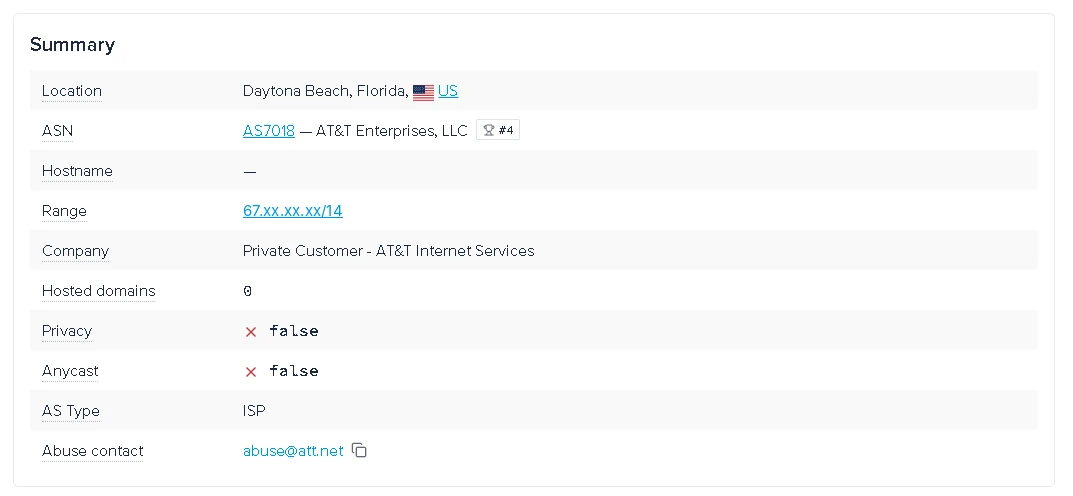
  1. We look up the IP on ipinfo.io to confirm which ISP and network (ASN) owns it.
  2. We confirm the IP has not been assigned to another customer before.
  3. We set the server up by hand and test the connection before we hand it over.
ipinfo.io check of an RDPextra residential IP: AS7018 AT&T Enterprises, Private Customer – AT&T Internet Services, AS type ISP, Daytona Beach, Florida
An AT&T IP we checked on ipinfo.io before delivery: AT&T’s network (AS7018), AS type ISP, not flagged as a proxy or VPN.

You can repeat the same lookup yourself on ipinfo.io once your server is delivered.

Real ISP line or proxy-routed?

Residential RDP reaches you in one of two ways. On a real ISP line, the server’s own connection comes from the internet provider, so it uses the residential IP directly. With a proxy-routed setup, a datacenter server sends its traffic out through a residential IP somewhere else. That costs less, but the server and the IP are separate, and the server is often shared.

Every plan on this page runs on a real ISP line. If you want the budget, proxy-routed option, see Residential IP RDP, from $28 a month.

Who uses Residential VPS?

People choose a residential VPS when a site or platform treats datacenter IPs differently from home connections. These are the most common reasons customers order one.

Survey & Research Work

  • Survey and panel sites that only accept residential IPs
  • The same IP every session, so your logins look consistent

Automation & Long Session Tasks

  • Run your tools on a residential ISP IP instead of a datacenter range
  • The server stays on, so long tasks keep running after you disconnect

Remote Desktop Work

  • Log in over Remote Desktop from any device
  • Your own Windows 10 desktop with full admin access

Social & Account Management

  • Manage accounts from one consistent US home-network IP
  • Fewer extra checks than on datacenter IPs that platforms flag

Testing & Ad Verification

  • See websites and ads the way a US home user sees them
  • Check location-based content on a real ISP network

Forex & Trading Platforms

  • For trading platforms that restrict datacenter or VPN access
  • An always-on connection for long trading sessions

Frequently asked questions

A residential VPS is a virtual private server whose IP address comes from a real US internet provider such as AT&T, CenturyLink, Spectrum or Cogent, not from a datacenter range. Websites see it much like a home connection, while you control your own Windows desktop. It is also called a residential IP VPS, an ISP VPS or a residential RDP.

Yes. Every RDPextra residential VPS on this page uses a USA ISP IP from AT&T, CenturyLink, Spectrum or Cogent. Plans cost $89.99 a month and are delivered in about 1–2 hours, after we check the IP by hand.

All four plans are $89.99 a month, billed monthly, with a fresh IP and an up to 1 Gbps port included. The price covers a dedicated Windows 10 server on a real residential ISP line, with the IP checked by hand and given to one customer.

New customers get 10% off the first invoice with code NEWRDPEXTRA. You can pay by credit or debit card, or by cryptocurrency (Bitcoin, Ethereum and USDT) through Cryptomus.

For a cheaper, proxy-routed option, see our Residential IP RDP from $28 a month.

People use one for survey and research platforms that block datacenter IPs, for managing accounts from one consistent US home-network IP, for testing how sites and ads look to a US user, and for long-running sessions. Some trading platforms that restrict datacenter access also work better from one. You still need to follow each platform’s rules.

No. A residential proxy sends your traffic out through someone else’s residential IP while your server stays in a datacenter. On a real ISP line, the server itself uses the residential connection, so there’s no proxy layer.

Proxy-routed setups cost less and are often shared. Our plans on this page run on real ISP lines.

Not always. A datacenter VPS is faster and cheaper, while a residential VPS is trusted more by websites because its traffic comes from a real ISP network.

Choose residential for surveys, account checks and location testing, and datacenter for speed-heavy work such as automation or hosting.

Look the IP up on ipinfo.io. The network should belong to a consumer ISP such as AT&T, the AS type should read “ISP”, and the IP shouldn’t be flagged as a proxy or VPN. We run this check before delivery, and you can repeat it once your server arrives.

Also ask any provider whether the server’s own line is residential or its traffic is proxy-routed, and whether the IP is fresh.

A fresh IP has never been assigned to another customer, so it starts with a clean history. Before delivery we confirm on ipinfo.io which ISP owns it, check it hasn’t been assigned before, set the server up by hand and test the connection.

A datacenter VPS can be created automatically in minutes, but a residential IP can’t be checked that way.

You can choose AT&T, CenturyLink, Spectrum or Cogent. The AT&T plan is our most popular, and all four have the same specs and price.

The city depends on stock, because each ISP’s IPs are assigned from what’s available when you order. If you need a particular state, message us before ordering and we’ll check.

Every plan is a Windows 10 RDP desktop with full administrator access, a 4-core CPU, 4 GB RAM, 40 GB SSD, a dedicated IP and a port of up to 1 Gbps. The plans are Windows only, so Linux and SSH aren’t available.

Real speed to a given site also depends on the ISP’s routing and the site itself.

This page covers USA IPs only. We sell residential RDP in other countries on separate pages, including the UK, Germany, Spain, Switzerland, Austria, Belgium, Japan, Australia and Singapore. Plans and ISPs differ by country, so check each page.

Possibly. IP type is only one factor. Sites may also look at browser fingerprints, activity patterns and request frequency. A residential IP reduces datacenter-based blocking but doesn’t bypass platform rules.

If the IP is blacklisted within about 10–15 days of delivery and the block wasn’t caused by how it was used, contact support and tell us where it was blocked. We can replace it with a new IP for a one-time $25 setup fee.

If the block came from how the IP was used, for example against a site’s rules, we can’t replace it.

Tell us within 24 hours of delivery. If the ISP, specs or plan type don’t match your order, we’ll refund you in full. Other cancellations have a $25 fee deducted. Other refund requests are reviewed case by case within 7 days under our Refund Policy.

Residential VPS hosting is a standard, widely used service. Whether a particular use is allowed depends on the laws where you are and the terms of the sites you use, and you’re responsible for following both. Using RDPextra servers for fraud or abuse is prohibited.

What our residential VPS customers say

⭐⭐⭐⭐

“Switched from a datacenter VPS because some US websites were restricting access. Residential RDP works better for my workflow now, although initial setup instructions could be clearer for beginners.”

Verified Residential RDP User
⭐⭐⭐⭐⭐

“Using it mainly for browsing and research on US-based websites. IP quality seems clean and connection feels similar to a normal home internet connection.”

Verified Residential RDP User

Need help choosing the right Residential VPS or RDP?

Our experts help you choose the right USA residential VPS setup based on your use case: surveys, research, browsing, automation, or remote desktop work.

Residential VPS Support Team
● Support available 24/7

24/7 Residential VPS Support

  • Help choosing the right residential IP VPS
  • Assistance with RDP connection setup
  • Advice on keeping long sessions connected

Manual Setup Assistance

  • Residential IP configured and tested before delivery
  • Help with first login and configuration

Fast Response Support

  • Live chat and support tickets
  • Technical help after delivery
  • Replies come from our support team, not a bot

Not sure which residential VPS plan fits your work? Talk to our expert before ordering.

Talk to a Residential VPS Expert

Ready for a residential VPS that's actually verified?

  • Real ISP-assigned IP, checked before delivery, not just claimed
  • Manually configured, not auto-provisioned
  • New customers: 10% off the first invoice with NEWRDPEXTRA
View Residential VPS Plans