


If you’ve just installed Kali Linux — on a physical laptop, inside VirtualBox, or with an external USB adapter — and you’re staring at a terminal with no internet connection, you’re not alone. Getting WiFi working from the command line trips up more people than it should, especially on virtual machines where the wireless card isn’t picked up automatically.
This guide shows you exactly how to connect to wlan0 in Kali Linux terminal, covering the nmcli and wpa_supplicant methods, VirtualBox setup, and auto-connect on boot.
Quick answer: Run
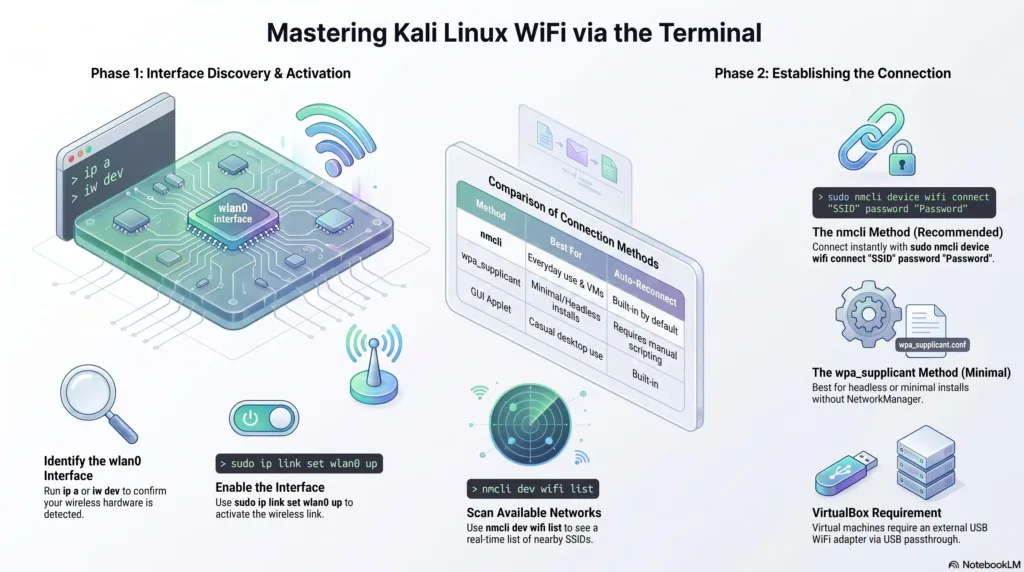
ip ato confirm wlan0 exists, bring it up withsudo ip link set wlan0 up, then connect withsudo nmcli device wifi connect "Your_WiFi_Name" password "Your_Password". No NetworkManager? Use wpa_supplicant with dhclient instead — covered below.
What Is Kali Linux?
Kali Linux is a Debian-based distribution built by Offensive Security for penetration testing, digital forensics, and security research. It ships with tools like Nmap, Wireshark, Metasploit, and Aircrack-ng, and runs on physical hardware, inside VirtualBox or VMware, or from a live USB drive. Getting the wireless interface working from the terminal is usually the first hurdle.
What Is wlan0 and How Does It Work?
wlan0 is simply the identifier for the wireless network interface Linux systems use to manage WiFi hardware — a built-in card or a USB adapter. Once it’s active, you can scan, connect, and manage everything from the command line.
A few basics worth knowing:
- Check it exists:
ip aoriw devlists all wireless interfaces. - Bring it up:
sudo ip link set wlan0 upactivates it if it’s down. - Connect: nmcli or wpa_supplicant (both covered below) handle the actual connection.
- Verify:
ping -c 4 google.comconfirms you actually have internet, not just a link.
Why Connect via Terminal Instead of the GUI?
The NetworkManager applet works fine for casual use, but the terminal gives more control — useful for scripting a Kali Linux WiFi setup, running Kali headless, or troubleshooting issues the GUI can’t diagnose.
| Aspect | GUI (NetworkManager Applet) | Terminal |
|---|---|---|
| Speed | Slower, multiple clicks | Fast, one command |
| Scripting / automation | Not possible | Easy to script |
| Works headless | No | Yes |
| Troubleshooting detail | Limited | Full error output |
Prerequisites
Before starting your Kali Linux WiFi setup, make sure of two things:
- A compatible WiFi adapter. Physical machines usually work out of the box; VirtualBox users need an external USB adapter.
- NetworkManager installed and running. Most Kali installs have this by default; check with
systemctl status NetworkManager.
Step 1: Check and Enable the wlan0 Interface
Confirm the system sees the interface:
ip a
or, for wireless-specific interfaces only:
iw dev
If wlan0 shows as DOWN, bring it up:
sudo ip link set wlan0 up
Nothing showing? Check the troubleshooting table further down.
Step 2: Connect to WiFi Using nmcli (Recommended Method)
If you’re wondering how to connect Kali Linux to WiFi from terminal the fastest way, the nmcli command Kali Linux ships with by default is it — it handles DHCP and DNS on its own.
# List available networks
nmcli device wifi list

# Connect to a network
sudo nmcli device wifi connect "Your_WiFi_Name" password "Your_WiFi_Password"

# Confirm the connection
nmcli connection show
No separate DHCP step needed.
Step 3: Connect Using wpa_supplicant Kali Linux Setup (No NetworkManager)
Running a minimal Kali install without NetworkManager? Use wpa_supplicant directly:
1. Create a configuration file:
sudo nano /etc/wpa_supplicant/wpa_supplicant.conf
2. Add your network details:
network={
    ssid="Your_WiFi_Name"
    psk="Your_WiFi_Password"
}
3. Connect and get an IP:
sudo wpa_supplicant -B -i wlan0 -c /etc/wpa_supplicant/wpa_supplicant.conf
sudo dhclient wlan0
4. Verify:
ip a show wlan0
nmcli vs. wpa_supplicant: Which Should You Use?
| nmcli | wpa_supplicant + dhclient | |
|---|---|---|
| Setup speed | One command | Multi-step |
| Best for | Everyday use, VMs | Minimal / headless installs |
| Auto-reconnect | Built-in | Needs manual scripting |
| Requires NetworkManager | Yes | No |
If you’ve compared iwconfig vs nmcli before: iwconfig is now legacy and deprecated on modern distributions, while nmcli is the standard.
How to Connect to wlan0 in Kali Linux VirtualBox
VirtualBox can’t access an internal WiFi card directly, so a Kali Linux VirtualBox WiFi adapter setup always needs an external USB adapter with USB passthrough:
- Plug in a compatible USB WiFi adapter on your host machine.
- Install the VirtualBox Extension Pack — needed for USB 2.0/3.0 passthrough.
- Attach it to the VM:
Devices > USBin the VirtualBox menu, then select your adapter. - Confirm inside Kali: run
ip aoriw dev— it should appear as wlan0. - Connect using either method covered above.
If it doesn’t appear, double-check the Extension Pack and confirm the chipset has Linux driver support (see the table below).
How to Auto Connect WiFi on Kali Linux Boot
Once you’ve connected once through nmcli, auto connect WiFi on Kali Linux boot works by default — no config file editing needed. Confirm with:
nmcli connection show
If it’s disabled, turn it back on:
sudo nmcli connection modify "Your_WiFi_Name" connection.autoconnect yes
This is the current, supported approach — editing /etc/network/interfaces directly is an older ifupdown method, largely unnecessary now that NetworkManager is the default.
Choosing the Right WiFi Adapter for Kali Linux
If you need an external adapter — for VirtualBox, or for tasks that need monitor mode — chipset compatibility matters more than the brand on the box.
| Adapter | Chipset | Monitor Mode | Band |
|---|---|---|---|
| Alfa AWUS036NHA | Atheros AR9271 | Yes | 2.4 GHz |
| Alfa AWUS036ACH | Realtek RTL8812AU | Yes | Dual-band |
| TP-Link TL-WN722N (v1 only) | Atheros AR9271 | Yes | 2.4 GHz |
| Panda PAU09 | Ralink RT5372 | Yes | 2.4 GHz |
Note: only the TP-Link WN722N v1 supports monitor mode — later revisions use a different chipset, so check the version before buying.
Troubleshooting: Common wlan0 and WiFi Issues
| Issue | Likely Cause | Fix |
|---|---|---|
| wlan0 missing entirely | Driver not installed, or USB not attached in VirtualBox | Check lsusb, reattach the device, install the correct driver |
| Interface shows but won’t connect | Wrong password, weak signal | Double-check credentials, inspect dmesg output |
| Connects but no internet | DNS or DHCP issue | Run sudo dhclient wlan0, check /etc/resolv.conf |
| Adapter detected on host but not in VM | Extension Pack missing | Install the VirtualBox Extension Pack, recheck Devices > USB |
| Doesn’t reconnect after reboot | Autoconnect disabled | Run nmcli connection modify "SSID" connection.autoconnect yes |
Why Is wlan0 Not Showing in Kali Linux?
It’s almost always one of three things: no Linux driver for the chipset, VirtualBox hasn’t passed the USB device through, or the interface is present but down. Run iw dev and lsusb — visible in lsusb but not iw dev means a driver problem; missing from both means a passthrough or hardware issue.
Conclusion
Once you understand what wlan0 is and how nmcli or wpa_supplicant handle the connection, you can connect to wlan0 in Kali Linux terminal in a couple of minutes, not an afternoon. Stick with nmcli for everyday use, fall back to wpa_supplicant on minimal installs, and remember VirtualBox always needs a passed-through USB adapter. With the interface checked and autoconnect confirmed, your setup will reconnect on its own every time you boot — leaving you free to get on with actual pentesting or everyday browsing.
Frequently Asked Questions
Run ip a to confirm wlan0 exists, bring it up with sudo ip link set wlan0 up, then connect using sudo nmcli device wifi connect "SSID" password "PASSWORD". This is the fastest method for most setups.
Usually it’s a missing driver for the adapter’s chipset, an adapter that hasn’t been passed through to VirtualBox, or an interface that’s simply down. Check iw dev and lsusb to narrow down the cause.
Connections made through nmcli auto-connect by default. Verify with nmcli connection show, and if it’s off, re-enable it with nmcli connection modify "SSID" connection.autoconnect yes.
No — VirtualBox doesn’t expose the host’s internal WiFi card to the guest OS. You need an external USB WiFi adapter, ideally one with monitor mode support if you also plan on wireless auditing.
Related Reading
