


Android applications are delivered in the form of APK (Android Package) files. These files are essentially compressed packages that contain everything an application needs to run seamlessly on an Android operating system—from the core source code to images, assets, and manifest files.
However, if you are a developer, security researcher, or a tech enthusiast, you might want to look under the hood. Whether your goal is to analyze an app’s security architecture, extract specific media assets, or modify features, you need to know how to unpack, open, and decompile APK files.
Since desktop operating systems do not natively support APK execution, achieving this requires specialized utilities. In this comprehensive guide, we will explore how to open APK files on Windows 10/11 and Linux, the tools required for full decompilation, and the essential safety protocols you must follow.
Why Do You Need to Extract APK Files?
Before diving into the technical steps, it is important to understand why extracting an APK file is a highly valuable skill for digital creators and developers alike.
- Application Backup & Restore: Apps frequently get updated, and sometimes new updates remove beloved features or introduce bugs. Extracting and saving a specific version’s APK allows you to archive and downgrade whenever necessary.
- Offline Sharing and Installation: In environments with limited internet connectivity, having the standalone APK file lets you distribute software across multiple devices via local storage or local networks.
- App Customization and Modding: Tech enthusiasts modify APKs to tweak user interface (UI) elements, remove unwanted layouts, alter color schemes, or inject custom features to personalize their user experience.
- Cross-Platform Testing: Mobile developers extract production APKs to run rigorous compatibility tests on various hardware configurations, screen aspect ratios, and Android emulators.
- Resource Extraction: Often, digital artists or developers want to extract high-quality UI assets, audio elements, or graphics stored deep inside the application package for analysis.
How to Open APK Files on Windows (Laptop/PC)
Windows does not feature out-of-the-box support to run or read Android packages. Depending on whether you simply want to see the files inside or actually run the application, you have two primary methods.
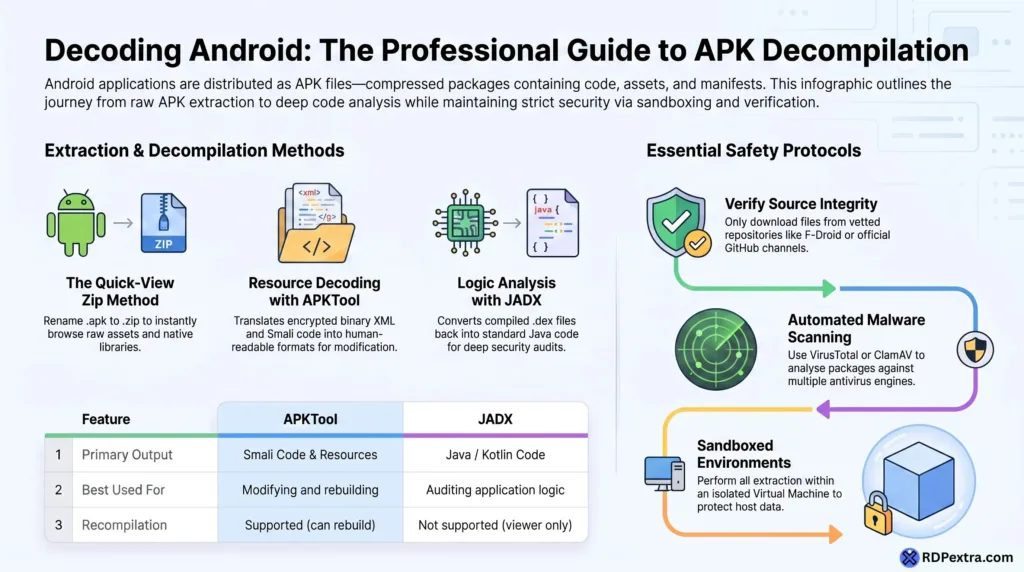
Method 1: The Quick Zip Trick (Viewing Only)
Because an APK is technically a compiled ZIP archive, you can change its file extension from .apk to .zip.
- Right-click the APK file on your Windows laptop.
- Select Rename and change the extension to
.zip. - Extract it using native Windows Explorer, WinRAR, or 7-Zip.
Note: This method exposes raw asset files and images, but resource files like
AndroidManifest.xmland code files (.dex) will remain encrypted and unreadable.
Method 2: Using Android Emulators (Running the App)
If your primary goal is to run the application on your laptop rather than modifying its code, you need an Android emulator.
- BlueStacks / NoxPlayer: Download and install either emulator on Windows 10/11. Once installed, simply double-click your downloaded APK file, and the emulator will install it automatically, creating a virtual Android environment on your PC.
- Windows Subsystem for Android (WSA): For advanced Windows 11 users, configuring WSA allows you to sideload and execute mobile applications natively alongside standard desktop software.
Step-by-Step Guide: Extracting APK Files on Linux
Linux offers powerful command-line utilities that make extraction, inspection, and deep reverse-engineering highly efficient. Here are the four primary methods used on Linux systems.
1. Using Standard Unzip Commands
If you only need quick access to raw assets, icons, or native libraries (.so files), use the built-in archive extraction command in your terminal:
Bash
unzip target_app.apk -d extracted_content/
This instantly unpacks the directory structure without changing file extensions manually.
2. Decompiling via APKTool
To convert the encrypted binary XML files (like layouts and permissions) into human-readable text, you must use APKTool. It decodes the resources to nearly original form and translates the application code into Smali files.
To install and run APKTool on Ubuntu/Debian-based systems:
Bash
sudo apt update && sudo apt install apktool
apktool d target_app.apk -o decompiled_source/
The -o flag specifies the output folder where your readable source manifests and resources will be stored.
3. Extracting Java Source Code Using dex2jar
Android compiles Java/Kotlin code into Dalvik Executable (.dex) files. To read the actual logical programming language, you must convert these .dex files back into standard standard Java .jar files.
Bash
d2j-dex2jar target_app.apk
After executing this, you can open the generated .jar file using a standalone Java decompiler like JD-GUI or JADX to read the human-written logic.
4. Running APKs on Linux via Anbox / Waydroid
To test or execute the package natively on a Linux desktop without heavy emulation overhead, containerized tools like Waydroid or Anbox are ideal:
Bash
sudo snap install anbox --beta --devmode
Advanced Reverse Engineering: APKTool vs. JADX
If you are looking into how to decompile APK files completely, you must choose the right tool for your specific objective. The table below outlines the core differences between the two industry-standard tools:
| Feature / Capability | APKTool | JADX (Java Decompiler) |
| Primary Output | Smali Code & Decoded Resources | Human-Readable Java/Kotlin Code |
| Best Used For | Modifying resources, rebuilding, and resigning the APK. | Analyzing application logic, code audits, and security reviews. |
| Recompilation Support | Yes (Can compile Smali back into a working APK). | No (Strictly a viewer/decompiler; cannot rebuild). |
| Interface | Command Line Interface (CLI) | Graphical User Interface (GUI) & CLI |
Safety Measures When Handling Untrusted APKs
Extracting and interacting with third-party software packages poses notable security threats. Malware, spyware, and keyloggers can easily be hidden inside altered packages. Always adhere to these industry-standard safety protocols:
1. Source Verification
Never download files from unverified forums or random file-sharing networks. Stick to highly regulated, safe repositories such as:
- F-Droid (For open-source software)
- APKMirror (Vetted, secure cryptographic signatures)
- Official developer GitHub channels
2. Automated Malware Scanning
Before parsing any package through your command line or desktop tools, run automated signature evaluations. On Linux systems, you can utilize the command-line antivirus ClamAV:
Bash
clamscan target_app.apk
Alternatively, upload the package to VirusTotal to analyze it against dozens of distinct commercial antivirus engines simultaneously.
3. Cryptographic Signature Verification
To guarantee that a package has not been tampered with or injected with malicious code post-release, use the official Android SDK tool called apksigner to check its signature integrity:
Bash
apksigner verify target_app.apk
Warning: If the command returns a signature mismatch or certificate failure warning, delete the file immediately.
4. Sandboxed Environments
Never decompile or run untrusted applications on your primary host operating system containing personal data. Always perform extraction tasks within an isolated Virtual Machine (VM) or a dedicated, sandboxed container environment.
Conclusion
Extracting and decompiling Android APK files opens up a world of customization, deep development research, and platform auditing. For desktop users looking to simple view inside or run applications, utilities ranging from everyday archiving software to robust emulators like BlueStacks offer an accessible pathway.
For developers, security experts, and power users, deployment of advanced toolkits like APKTool, JADX, and dex2jar provides absolute transparency into an application’s internal infrastructure.
However, remember that with great power comes responsibility. Always prioritize security by auditing your files for malware, verifying cryptographic signatures, and working inside sandboxed virtual environments. By pairing the right tools with strict security protocols, you can safely explore the Android ecosystem.
Frequently Asked Questions (FAQs)
Yes, you can easily view basic contents. Since an APK file is essentially a compressed ZIP archive under a different extension, you can simply rename the file extension from .apk to .zip. Once renamed, use standard tools like Windows Explorer, 7-Zip, or WinRAR to extract it. This method grants immediate access to raw assets, icons, and images; however, core files like AndroidManifest.xml and layout resources will remain encrypted and unreadable unless parsed through a dedicated tool like APKTool.
Both tools serve entirely different purposes in the reverse-engineering workflow:
APKTool: It decodes the app’s resources into their near-original form and translates the binary code into Smali code. Its biggest advantage is that it supports recompilation, allowing you to modify files and rebuild them back into a working APK.
JADX: It decompiles the binary Dalvik Executable (.dex) files directly into human-readable Java or Kotlin source code. It features a clean Graphical User Interface (GUI) making it perfect for auditing code logic, but it cannot recompile or rebuild an APK.
No, extraction or decompilation is not necessary if your only goal is to use the application on your computer. To run an Android app on a laptop or PC, you simply need to install an Android emulator such as BlueStacks or NoxPlayer. Once the emulator is active, you can directly import and run the APK file. Windows 11 users can also utilize the Windows Subsystem for Android (WSA) to execute apps natively.
Decompiling an APK file for educational purposes, security auditing, malware analysis, or personal customization generally falls under fair use and is considered legal. However, decompiling a copyrighted application to pirate premium features, reverse-engineer proprietary algorithms to steal intellectual property, or rebrand and republish someone else’s work as your own is strictly illegal and violates copyright laws.
Related Reading
